Getting started
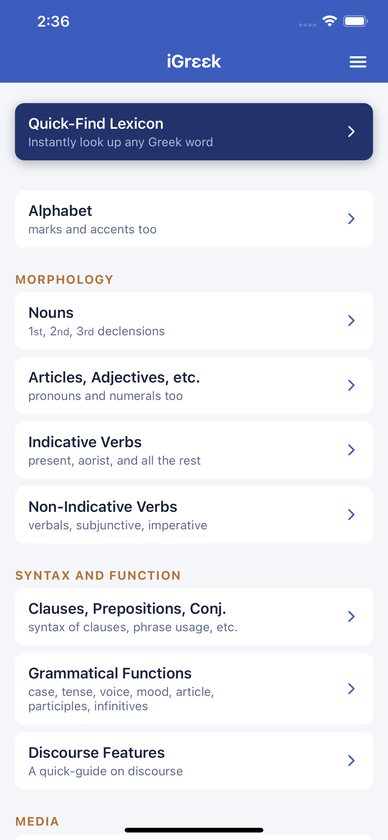
- Open iGreek. It starts on the Home screen.
- At the top, the highlighted Quick-Find Lexicon card takes you straight to the lexicon.
- Below it are the grammar sections. Tap any section to open its pages.
- Use the back arrow at the top left, or swipe in from the left edge on iPhone, to go back.
All the grammar, glossary and lexicon content is built into the app and works without an internet connection. Only the videos need one.
The menu
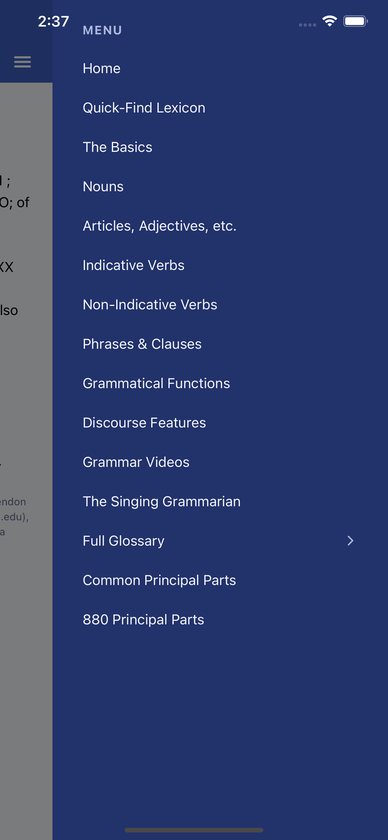
Tap the menu icon (three lines) at the top right of any screen. The menu opens from the right and works as a shortcut list from anywhere in the app. It lists Home, the Quick-Find Lexicon, every grammar section, Grammar Videos, The Singing Grammarian, Full Glossary, Common Principal Parts and 880 Principal Parts.
Grammar sections
- Alphabet. The letters, marks and accents, with buttons to the Alphabet Song and the vowel and consonant videos.
- Nouns. First declension (καρδία, μαθητής), second declension (θεός, ἔργον), third declension (σάρξ, σῶμα) and common case functions. Each declension page links to its Singing Grammarian song.
- Articles, Adjectives, etc. The article (“24 ways to say ‘the’”), adjective tables (ἀγαθός, πᾶς, comparatives), personal pronouns, demonstratives (οὗτος, ἐκεῖνος), correlatives and possessives, relatives and indefinite relatives, interrogative and indefinite pronouns (τίς, τις), negative, reflexive and reciprocal pronouns, and numerals.
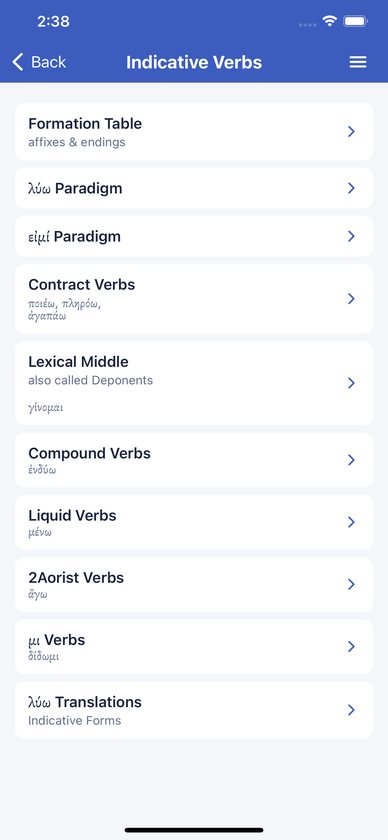
- Indicative Verbs. A formation table of affixes and endings, the λύω and εἰμί paradigms, contract verbs (ποιέω, πληρόω, ἀγαπάω), lexical middle or deponent verbs (γίνομαι), compound verbs (ἐνδύω), liquid verbs (μένω), second aorist verbs (ἄγω), μι verbs (δίδωμι) and translations of the λύω forms.
- Non-Indicative Verbs. Participles, infinitives, subjunctives, imperatives and optatives, each with its formation and the λύω paradigm.
- Clauses, prepositions and conjunctions. Clause syntax, a chart of spatial prepositions, the meanings of every preposition, how to tell the subject from the predicate nominative in equative clauses, conjunctions, and conditional sentences by type and class.
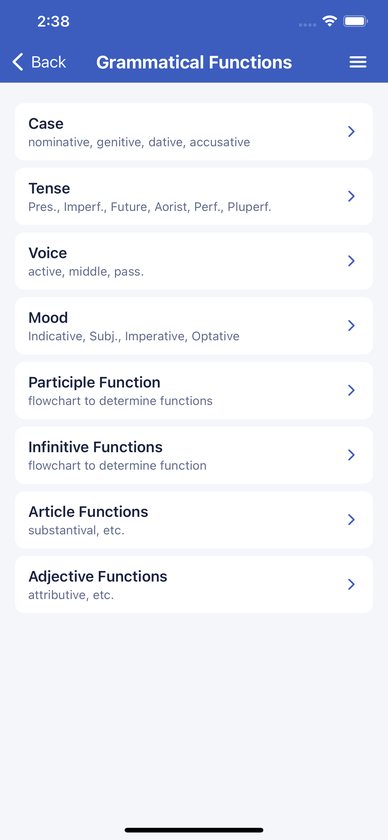
- Grammatical Functions. Case, tense, voice and mood, a participle function flowchart, an infinitive function flowchart, article functions and adjective usage.
- Discourse Features. A quick guide to discourse features.
Many pages have buttons that jump straight to the matching video or song.
Zooming tables and charts
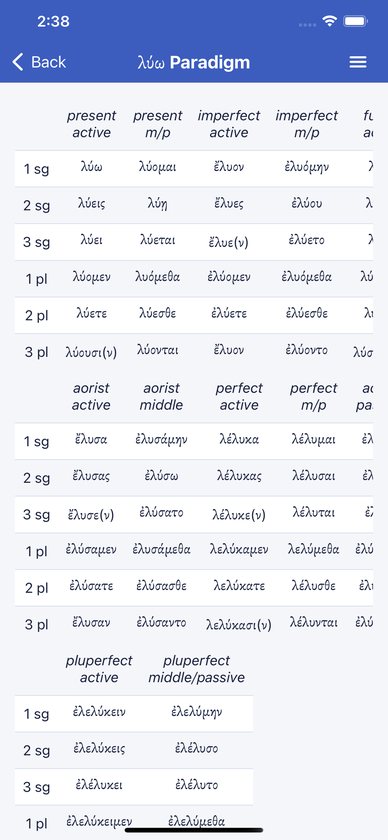
Paradigm tables and charts can be enlarged.
- Pinch with two fingers to zoom, up to 4×, and drag with two fingers to move around.
- Double-tap to zoom to 2×. Double-tap again to reset.
Very long tables, such as the glossary pages and the 880 principal parts list, scroll as lists instead. Wide ones also scroll sideways.
Quick-Find Lexicon
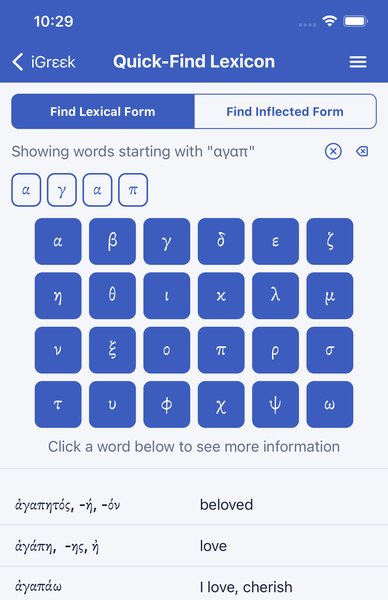
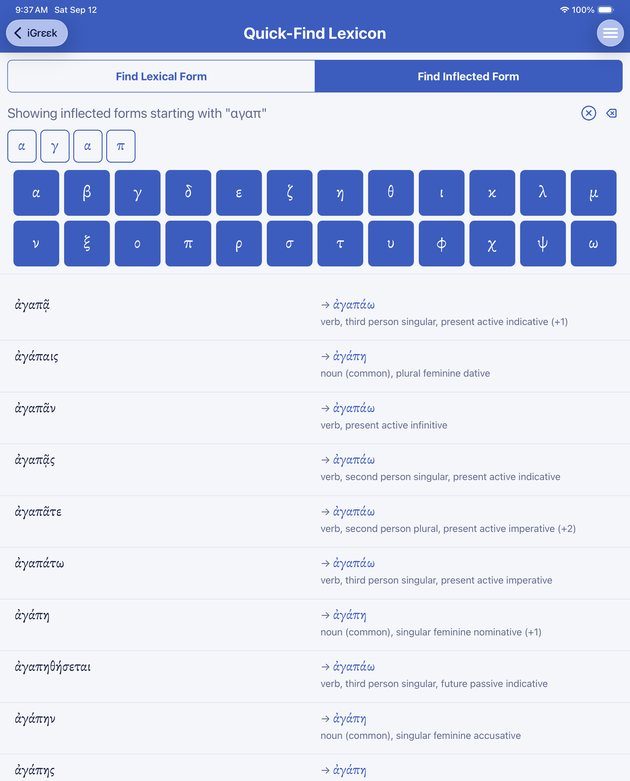
Open it from the Home card or the menu. There are two tabs at the top.
- Find Lexical Form. Tap letters on the 24-key Greek keyboard. The list shows every glossary word starting with those letters, with its meaning, and narrows as you type. Tap a word to open its word card.
- Find Inflected Form. Tap the letters of a word as it appears in the text. The list shows the attested forms that start with your letters. Each row shows the form, an arrow to its lexical form and a short parsing. Tap the row to open the lexical form’s word card.
Keyboard tips:
- Accents, breathing marks and capitals are ignored, so tap bare letters only.
- There is no separate final sigma key. Tap σ; it matches ς too.
- The letters you’ve typed appear as tiles above the keyboard. ⌫ deletes the last letter and the circled ✕ clears everything. Switching tabs also clears your letters.
- You can type up to 24 letters.
In the inflected tab, “+1” or a similar number after a lemma means the form could belong to more than one lexical word, usually words that differ only in breathing or iota subscript. iGreek opens the most frequent one. A number in brackets after the parsing, such as “(+1)”, means the same form can be parsed more than one way.
Word cards
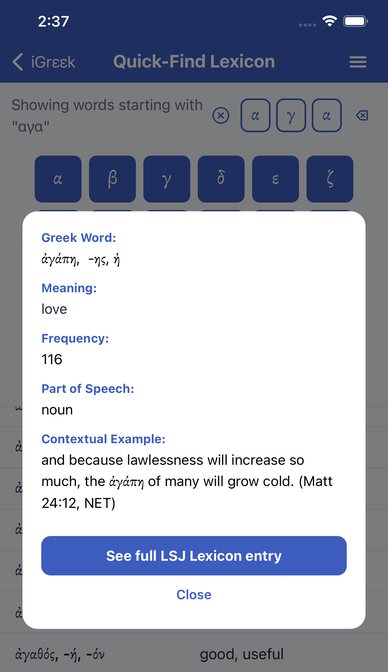
A word card pops up over the screen with what the glossary has for that word:
- Greek Word, Meaning, Frequency (how often it occurs in the New Testament) and Part of Speech;
- Root(s) and English Derivative(s);
- a Contextual Example, a New Testament verse from the NET Bible;
- Principal Parts for verbs;
- a See full LSJ Lexicon entry button, when iGreek has the LSJ entry for that word.
Tap Close, or tap outside the card, to dismiss it. If an inflected form points to a word that isn’t in iGreek’s vocabulary list, the card says “(not in this app’s vocabulary list)”.
Full LSJ entries
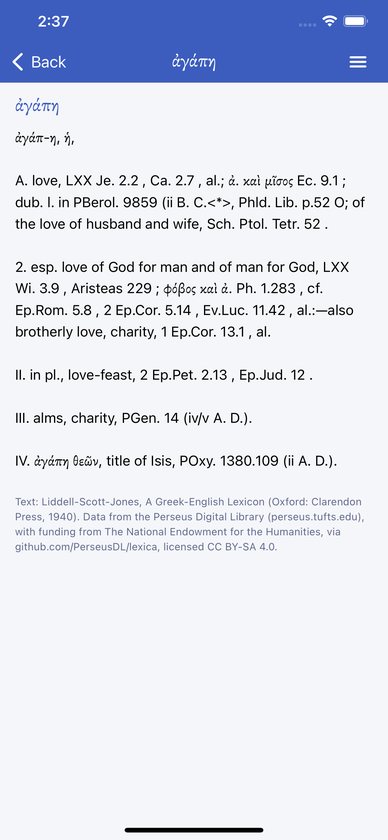
The LSJ screen shows the headword and the full entry from Liddell-Scott-Jones, A Greek-English Lexicon (1940), with the Perseus Digital Library credit at the bottom. About 4,500 of the 6,685 glossary words have one. Use the back arrow to return.
Full glossary
Open Full Glossary in the menu, tap it to show the letter ranges, and choose one. Each page lists the words with their meanings. Tap any row to open that word’s card.
Principal parts
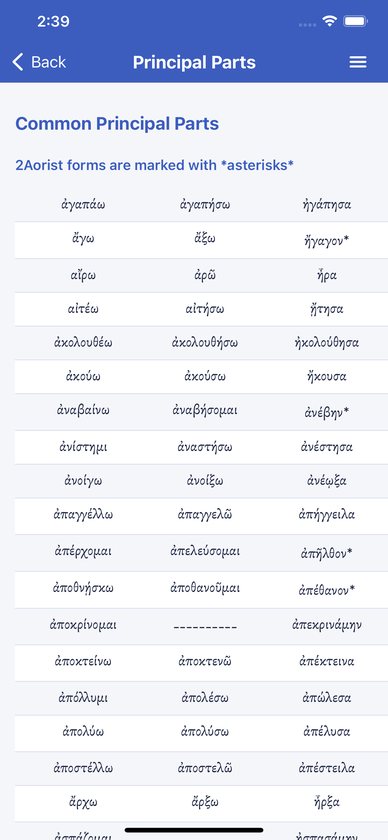
- Common Principal Parts lists the most common verbs and their principal parts. Second aorists are marked with asterisks.
- 880 Principal Parts is a long scrolling list of the principal parts of 880 verbs.
Videos and the Singing Grammarian
- Grammar Videos has 5 review videos: Greek Vowels, Greek Consonants, Noun Formation, Indicative Verbs, and Alternate Patterns for indicative verbs.
- The Singing Grammarian has 18 songs with visual presentations, covering the alphabet, the declensions, the article, the present, imperfect and secondary endings, the aorist, the future, liquid verbs, passives, the perfect and pluperfect, μι verbs, the subjunctive, the imperative, infinitives and participles. The banner at the top opens the Singing Grammarian website in your browser.
The videos play inside the app from YouTube and need an internet connection. To watch fullscreen, use the player’s own fullscreen button. The screen turns to landscape, and when you close fullscreen it returns to portrait and carries on from the same point.
Buying and installing
iGreek is a one-time purchase. There are no in-app purchases, no subscription and no account, so there’s nothing to restore. To install it on another device, download it again while signed in with the same Apple ID or Google account. You won’t be charged twice. On Google Play it’s listed as “iGreek - grammar aids for NT”.
Common questions
Do I need an internet connection?
Only for the videos. The grammar, glossary, word cards and LSJ entries are all on your device.
How do I type accents or breathing marks?
You don’t need to. Lookup ignores them, so tap the bare letters.
Where is final sigma?
Tap σ. It matches final sigma too.
I know the word in the text but not its dictionary form. What do I do?
Open the Quick-Find Lexicon, choose Find Inflected Form and tap the letters as they’re printed.
Why does a parsing say “(+1)”?
That form can be parsed more than one way. iGreek shows the first parsing, so check the context.
Why do some words have no LSJ button?
Not every glossary word was matched to an LSJ entry. The ones without are mostly rare words and proper names.
What does Frequency mean?
How many times the word occurs in the Greek New Testament.
Does the glossary cover the whole New Testament?
Yes. It lists the vocabulary of the New Testament, 6,685 entries in all.
Which textbook does iGreek follow?
It isn’t keyed to one textbook’s chapters. The paradigms use the standard model words, like λύω, καρδία, θεός and δίδωμι, so it works alongside whichever grammar your course uses.
Can I make the tables bigger?
Yes. Pinch to zoom, or double-tap a page.
Does iGreek work on iPad?
Yes. The layout scales up for tablets.
Is there a dark mode?
No. iGreek uses a light theme only.
Does iGreek track me or show ads?
No. There are no ads, accounts or analytics. It does send anonymous crash reports, as the privacy policy explains.
Troubleshooting
- A video won’t play or stays black. Check your internet connection, then leave the page and come back. If it still fails, try the player’s fullscreen button.
- The screen is stuck in landscape after a video. Close fullscreen with the player’s exit button, and the app turns back to portrait. Rotating the device also works.
- No results while typing. Check for an extra letter (use ⌫), and check you’re on the right tab. A printed form won’t match on the lexical tab.
- A word card says “(not in this app’s vocabulary list)”. That form’s lemma isn’t in iGreek’s glossary. Try the lexical tab or the Full Glossary.
- A page is zoomed and won’t scroll normally. Double-tap to reset the zoom.
- The icon looks wrong after an update on Android. Your launcher may be showing a cached icon. Restarting the device fixes it.
- The app crashes. Update to the latest version from the store. Crash reports are sent automatically, but an email describing what you tapped helps the bug get fixed faster.
Still stuck?
Email support@alephtoomega.com with "iGreek" in the subject. It helps to include your device model, its iOS or Android version, and what you were doing when the problem happened.