
Getting started
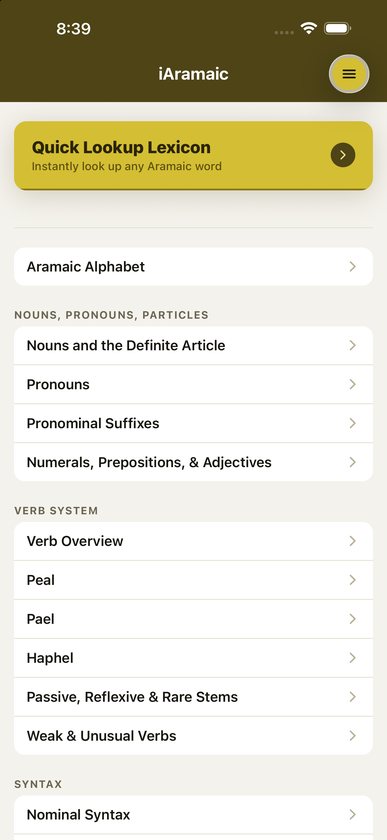
- Open iAramaic. The Home page lists everything in the app.
- At the top of Home, Quick Lookup Lexicon takes you straight to the lexicon.
- Below it, pages are grouped under Aramaic Alphabet, Nouns, Pronouns, Particles, Verb System, Syntax and Reference. Tap any card to open that page.
- Tap Back at the top left to return, or the menu button at the top right to jump anywhere.
The menu
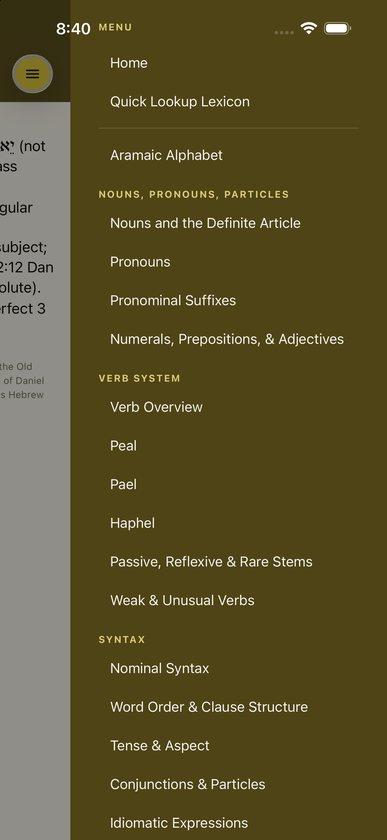
Tap the round gold menu button at the top right. The menu slides in from the right and lists:
- Home and Quick Lookup Lexicon;
- every page from the Home list, under the same section headings;
- Paradigm Charts, which you can expand to list every noun, pronoun and verb chart, plus the Summary Verb Chart;
- Glossary, which you can expand to list all 22 letters.
Tap outside the menu to close it.
Grammar pages
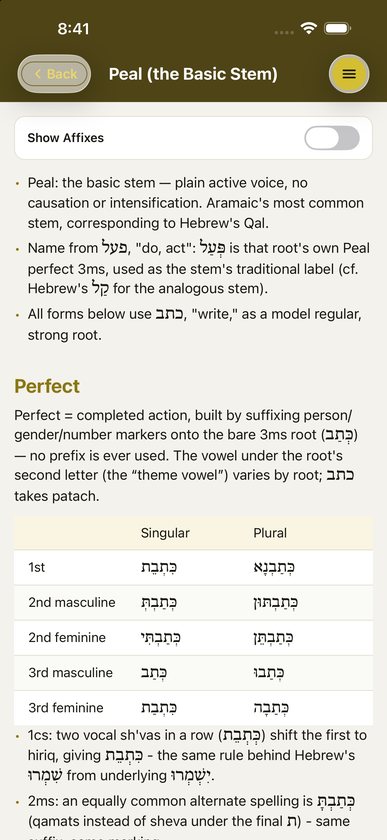
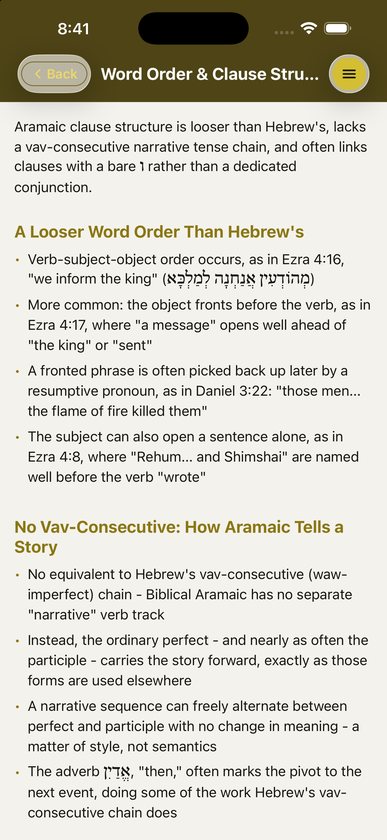
Each topic page has short explanations, bullet lists and tables of forms.
- Aramaic Alphabet. Consonants, how Aramaic consonants correspond to Hebrew ones, recognizing cognates, vowels, the Canaanite shift, pretonic reduction and segolate nouns.
- Nouns and the Definite Article. The determined state, which does the work of Hebrew’s article, the full noun paradigm, plurals in ־ִין, irregular plurals and the dual.
- Pronouns. Independent, demonstrative, interrogative and indefinite pronouns, אִיתַי, and the relative particle דִּי.
- Pronominal Suffixes. Suffixes on nouns and verbs, energic nun and resumptive pronouns.
- Numerals, Prepositions, & Adjectives.
- The verb system. Verb Overview, Peal, Pael, Haphel, Passive, Reflexive & Rare Stems, and Weak & Unusual Verbs.
- Syntax. Nominal Syntax, Word Order & Clause Structure, Tense & Aspect, Conjunctions & Particles, and Idiomatic Expressions.
Wide tables scroll sideways. On iPhone and iPad you can also pinch to zoom a page.
Paradigm charts
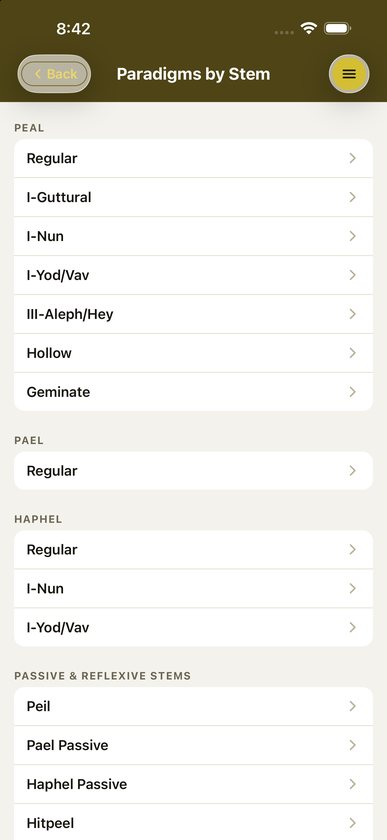
Open Paradigm Charts from Home, under Reference, or from the menu. You can browse them four ways:
- Browse by Stem. Peal (regular, I-guttural, I-nun, I-yod/vav, III-aleph/he, hollow, geminate); Pael; Haphel (regular, I-nun, I-yod/vav); Peil, Pael Passive, Haphel Passive, Hitpeel and Hitpaal.
- Browse by Weak Root. The same charts, grouped by root type across the stems.
- Summary Verb Chart. All eight stems side by side, each on its model root.
- Nouns & Pronouns. Noun states, independent and demonstrative pronouns, and pronominal suffixes on nouns and prepositions.
Each verb chart is built on one model root and shows the perfect and imperfect, the imperative and participle, the infinitive and, where the stem has them, the jussive and passive participle. Weak-root charts open with a short note on what makes that root behave differently. “XXX” in a cell means there is no attested example of that form.
Show Affixes
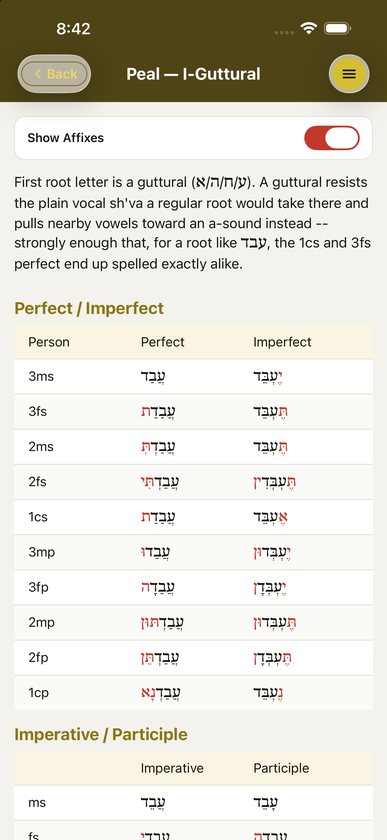
Pages with tagged forms, which means every paradigm chart and the grammar pages with form tables, have a Show Affixes switch at the top. Turn it on to color the prefixes and suffixes red, so the stem stands apart from its endings. In מַלְכָּא, for example, the final א of the determined state turns red.
The setting carries over to every page and is remembered after you close the app. Pages without tagged forms don’t show the switch.
Quick Lookup Lexicon
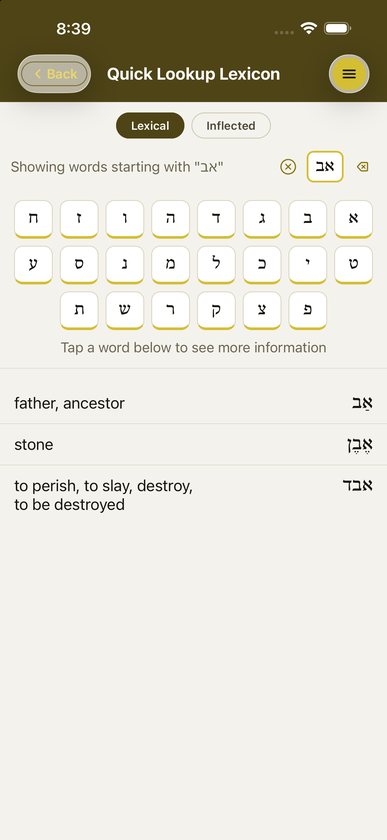
- Open it from the top of Home or from the menu.
- Choose Lexical for the dictionary form or Inflected for the form as printed in the text. Switching modes clears your search.
- Tap consonants on the Aramaic keyboard. It runs right to left, starting with א at the right.
- The results narrow as you type. In Lexical mode each row shows the meaning on the left and the word on the right. In Inflected mode each row shows the form on the right and its parsing on the left, for example “Peal, perf., 3ms”, or “2 possible words”.
- Tap a row for the word’s details.
Some typing tips:
- Type consonants only. Vowel points are ignored when matching.
- Type the regular form of final letters, such as כ for ך. Final forms are matched automatically.
- The ⌫ key deletes one letter and the ⓧ button clears the search.
In Inflected mode:
- If a form could belong to more than one word, a Which word is this? box lists each possible lemma with its parsing. Tap the one that fits your context.
- If a lemma’s consonants match more than one glossary entry, you’ll be asked to choose between them.
- If the word has no glossary entry yet, you’ll see “This word isn’t in the glossary yet.”
Word details
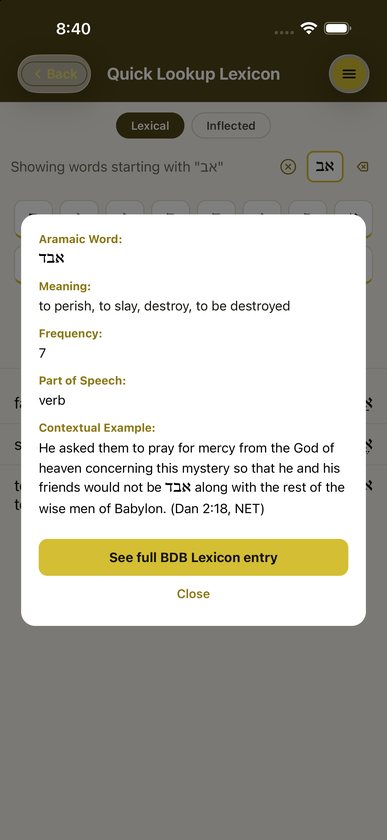
The details box shows Aramaic Word, Meaning, Frequency, Part of Speech and a Contextual Example, a verse from Daniel or Ezra with its reference. On iPhone and iPad you can pinch to zoom the box.
Tap See full BDB Lexicon entry to read the full article, or Close to go back to your results.
Full BDB entries
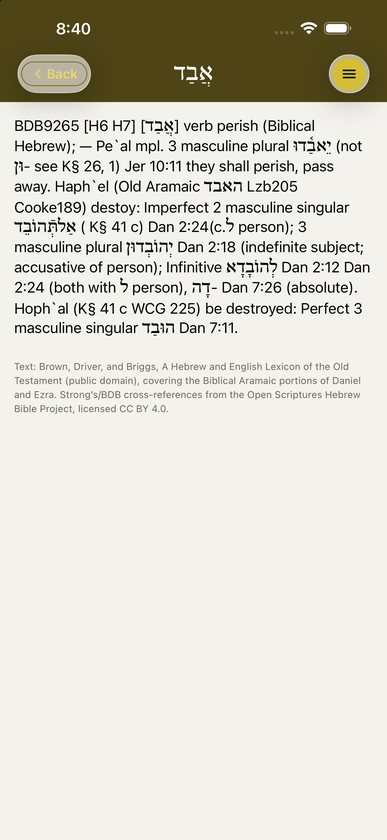
The BDB Lexicon Entry page gives the complete Brown-Driver-Briggs article for the word, from BDB’s Biblical Aramaic section, with the source credit at the bottom. Tap Back to return.
The glossary
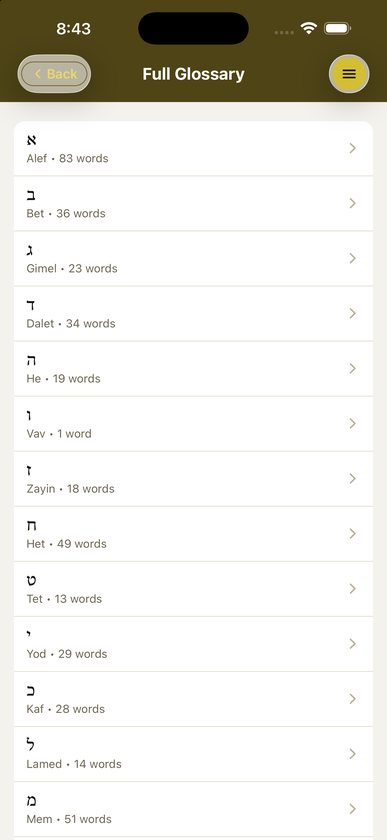
Open Glossary from Home, under Reference, or expand it in the menu. Pick a letter; each one shows how many words it has, from one under Vav to 83 under Alef. Every word is listed with its meaning. Tap a word for the same details box you see in the lexicon.
Settings
There is no settings screen. The only preference is Show Affixes, which is saved automatically.
Buying and installing
iAramaic is still in development. It has no in-app purchases and no subscription, so everything will be included from the start. Its price will be listed on the App Store and Google Play when it’s released.
Common questions
Which textbook does iAramaic follow?
The grammar summary follows Frederick E. Greenspahn’s An Introduction to Aramaic (2nd ed., SBL, 2003). The explanations are written fresh, so the app works alongside any first-year Aramaic course.
Does it cover all of Biblical Aramaic?
The lexicon has the 704 words of the Bible’s Aramaic chapters in Daniel and Ezra, and inflected lookup covers every attested form in them.
What stem names does it use?
Peal, Pael, Haphel, Peil, Pael Passive, Haphel Passive, Hitpeel and Hitpaal. Paradigm page titles add the G, D and H labels, for example “Peil (G Passive)” and “Hitpeel (Gt)”, so you can match them to whichever system your textbook uses.
What does Show Affixes do?
It colors the prefixes and suffixes in a form red, so you can see the stem and its endings separately.
Why doesn’t every page have the Show Affixes switch?
Only pages whose forms have been tagged for affixes show it. That means the paradigm charts and the grammar pages with form tables.
Why can’t I type vowel points?
You don’t need them. The lexicon matches on consonants, so you can find a word even when you’re unsure of its pointing.
What’s the difference between Lexical and Inflected?
Lexical searches dictionary forms. Inflected searches the forms actually printed in Daniel and Ezra, prefixes and suffixes included, and tells you which word each one belongs to and how it’s parsed.
What does “XXX” mean on a chart?
There is no attested example of that form in that stem.
Where do the example verses come from?
They are quoted from the NET Bible.
Do I need an internet connection or an account?
No. Everything is on your device, and there’s no sign-in.
Is iAramaic related to iHebrew and iGreek?
Yes. Danny built all three the same way, so if you’ve used iHebrew the layout will feel familiar.
Does it work on iPad?
Yes, with larger text and a taller header.
Troubleshooting
- No results in the lexicon. Check the mode. A prefixed or inflected form won’t appear in Lexical mode, so switch to Inflected.
- The Show Affixes switch is missing. That page has no affix-tagged forms.
- A table is cut off. Scroll it sideways, or turn the device to landscape.
- I can’t find a paradigm. Open the menu, expand Paradigm Charts and look under the stem’s heading. Weak roots are grouped under their stem.
- “This word isn’t in the glossary yet.” The form is in the text but its lemma doesn’t have an entry. Please tell us which word it is.
- The app crashes. Update to the latest version. Crash reports are sent automatically, but an email describing what you tapped helps the bug get fixed faster.
Still stuck?
Email support@alephtoomega.com with "iAramaic" in the subject. It helps to include your device model, its iOS or Android version, and what you were doing when the problem happened.